

How to Use a DC Power Supply to Diagnose Mobile Phone Charging Problems
A DC power supply can help mobile phone repair technicians investigate charging problems by showing how a phone or compatible test circuit responds to a controlled power source. By observing voltage and current consumption, a technician can gather useful clues about power-related faults.
However, a DC power supply does not automatically identify a faulty charging port, battery, charging IC or motherboard component. Accurate diagnosis requires a systematic process and, where necessary, additional tools such as a multimeter.
This guide explains how technicians can use a DC bench power supply as part of a mobile phone charging diagnosis.
What can a DC power supply tell you about a charging problem?
A regulated DC power supply allows a technician to provide controlled power to a compatible test connection and observe the circuit’s current consumption.
This can help investigate:
- Phones that do not power on.
- Devices with abnormal current consumption.
- Suspected motherboard short circuits.
- Power-related faults following liquid damage.
- Devices that show unusual behaviour during controlled power testing.
It is important to distinguish a charging fault from a general power fault. A phone that does not charge may have a damaged charging port, faulty cable, defective battery, charging circuit problem or motherboard fault. Power-supply testing is only one part of the investigation.
1. Inspect the phone before connecting a power supply
Start with a physical inspection. Do not immediately connect a bench supply to a phone that has a charging problem.
Check the following:
- Inspect the charging port for dirt, corrosion, bent contacts or physical damage.
- Look for signs of liquid damage.
- Check the charging cable and adapter using known-good compatible accessories.
- Inspect the battery for swelling or other visible damage.
- Check whether the phone responds to a known-good charger.
- Record any symptoms, including whether the phone vibrates, displays a charging icon or heats up.
A damaged or swollen battery should be handled appropriately. Do not attempt to charge or test a visibly damaged battery.
2. Understand where the DC power supply fits into diagnosis
A DC bench power supply is useful for controlled power testing, but it is not a universal replacement for a phone charger.
A technician may use a suitable power supply with an approved battery-terminal connection, test fixture or other model-specific diagnostic method.
Before connecting anything, confirm:
- The correct connection points for the specific phone model.
- The required voltage and polarity.
- Whether the battery must be disconnected.
- The manufacturer’s or repair procedure’s recommended current limits.
- Whether the test method is appropriate for the device’s power-management design.
Never connect a bench supply directly to an unidentified charging port or apply an arbitrary voltage to a phone’s USB input. Use the correct charging protocol and suitable equipment for USB charging tests.
3. Set the correct voltage and current limit
Voltage and current settings must match the specific diagnostic procedure.
A power supply rated at 30V 5A does not mean a technician should apply 30 volts or allow 5 amps into a phone. Those figures describe the unit’s maximum rated capacity, not the correct settings for every device.
Before switching on the output:
- Confirm the phone model and the correct test procedure.
- Verify the required voltage and polarity.
- Set an appropriate current limit for the test.
- Check the leads and connections.
- Confirm the output settings before connecting the device.
- Enable the output only when the connection is correct.
If you are still choosing equipment, read our guide on how to choose a DC power supply for mobile phone repair. You can also compare the differences in 30V 5A vs 15V 2A DC power supplies.
4. Observe the current consumption
One useful feature of a bench power supply is its current display. During a suitable controlled test, the reading can help a technician understand how the connected circuit responds when power is applied.
The reading should always be interpreted in the context of the phone model, connection method and test procedure.
For example:
- No current draw: May indicate an open connection, incorrect polarity, disconnected test point or a circuit that is not drawing power under the test conditions.
- Unexpectedly high current draw: May indicate a short circuit or another abnormal load. Further testing is required to locate the cause.
- Fluctuating current: May be associated with repeated startup attempts, an unstable connection or a circuit responding abnormally.
- A stable reading: Does not automatically prove that the charging system is healthy. Additional checks may still be necessary.
These are diagnostic clues, not universal fault codes. Different phone models and test methods can produce different readings.
5. Use a multimeter to investigate the charging circuit
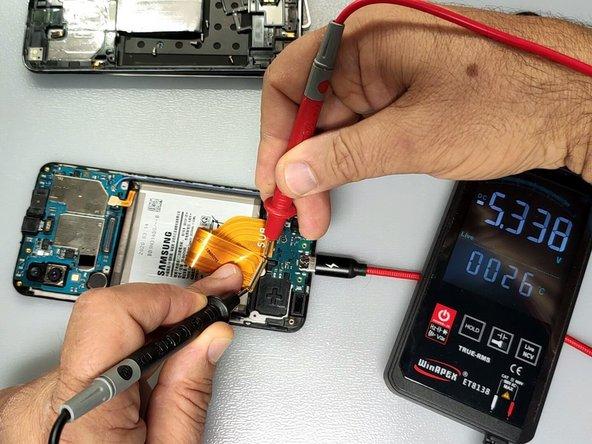
A multimeter complements a DC power supply by allowing technicians to perform electrical checks at specific points in a circuit.
Depending on the phone and the fault, a technician may check:
- Charging-port connections.
- Continuity through relevant circuit paths.
- Voltage at specified test points.
- Battery voltage using the correct procedure.
- Suspected open circuits or short circuits.
Always use the correct meter mode and range. Never perform resistance or continuity measurements on an energised circuit.
A DC power supply helps provide controlled power and observe current consumption. A multimeter helps investigate specific electrical points. Using both appropriately provides a more complete diagnostic picture.
6. How to narrow down the cause of a charging problem
Charging faults can originate from different parts of the phone. Avoid replacing components based on a single symptom or current reading.
| Possible fault | What to investigate |
|---|---|
| Damaged charging port | Physical condition, connector pins and relevant circuit connections |
| Faulty charging cable or adapter | Test with known-good compatible accessories |
| Defective battery | Battery condition and appropriate battery tests |
| Charging circuit fault | Relevant charging-path components and voltage checks |
| Motherboard short circuit | Current consumption and further board-level investigation |
| Liquid damage | Corrosion, damaged components and affected circuit paths |
The goal is to identify the faulty section before replacing parts. This reduces unnecessary component changes and helps avoid misdiagnosis.
7. Common mistakes when using a DC power supply
Applying the maximum rated voltage: A 30V supply should not be set to 30V simply because that is its maximum rating. Use the correct procedure and settings for the device.
Ignoring polarity: Incorrect positive and negative connections can damage electronic components.
Connecting directly to the charging port: A bench supply should not be connected arbitrarily to a USB input. Use appropriate charging equipment and test fixtures.
Treating every high-current reading as a short circuit: An unusual reading requires investigation. It is not proof of a specific failed component.
Ignoring the battery condition: A damaged or swollen battery should not be subjected to routine charging tests.
Skipping multimeter checks: Current consumption alone rarely provides enough information to identify the exact cause of a charging fault.
Frequently asked questions
Can a DC power supply diagnose a phone that is not charging?
It can help investigate power-related faults by providing controlled power through a suitable test connection and allowing the technician to observe current consumption. It does not independently identify every charging-system fault.
Can I connect a DC power supply directly to a phone charging port?
Not arbitrarily. A phone’s USB input may require specific charging protocols and protection circuitry. Use suitable charging equipment and model-appropriate test procedures.
What does zero current on a DC power supply mean?
It may indicate an open connection, incorrect polarity, an unsuitable test point or a circuit that is not drawing power under the test conditions. Further checks are needed before identifying the fault.
Does high current consumption mean a phone has a short circuit?
Not necessarily. Abnormally high current can indicate a short circuit or another fault, but the reading must be interpreted alongside the test setup and additional measurements.
Do I need both a DC power supply and a multimeter?
For many motherboard-level diagnostic tasks, both are useful. A bench supply provides controlled power and current readings, while a multimeter helps check voltage, resistance and continuity at specific circuit points.
Can a DC power supply replace a phone charger?
No. A bench supply is primarily a controlled electronics testing tool. It does not automatically reproduce the charging protocols and functions of a compatible phone charger.
Get mobile phone repair equipment in Nairobi
Accurate charging diagnosis requires the right equipment and a methodical approach. A regulated DC power supply, a reliable multimeter and suitable motherboard repair tools can help technicians investigate faults more effectively.
Mutesh Ventures Ltd supplies mobile phone repair equipment and workshop tools to technicians and repair businesses in Kenya.
Explore the Mutesh Ventures equipment catalogue or contact the team to enquire about available DC power supplies and other diagnostic equipment.
Mutesh Ventures Ltd
Accra Towers, 7th Floor, Shop D3, Kenneth Matiba Road, Nairobi CBD, Kenya
Phone: 0724 946 622
Email: contact@muteshventures.com

Add a review
Your email address will not be published. Required fields are marked *