

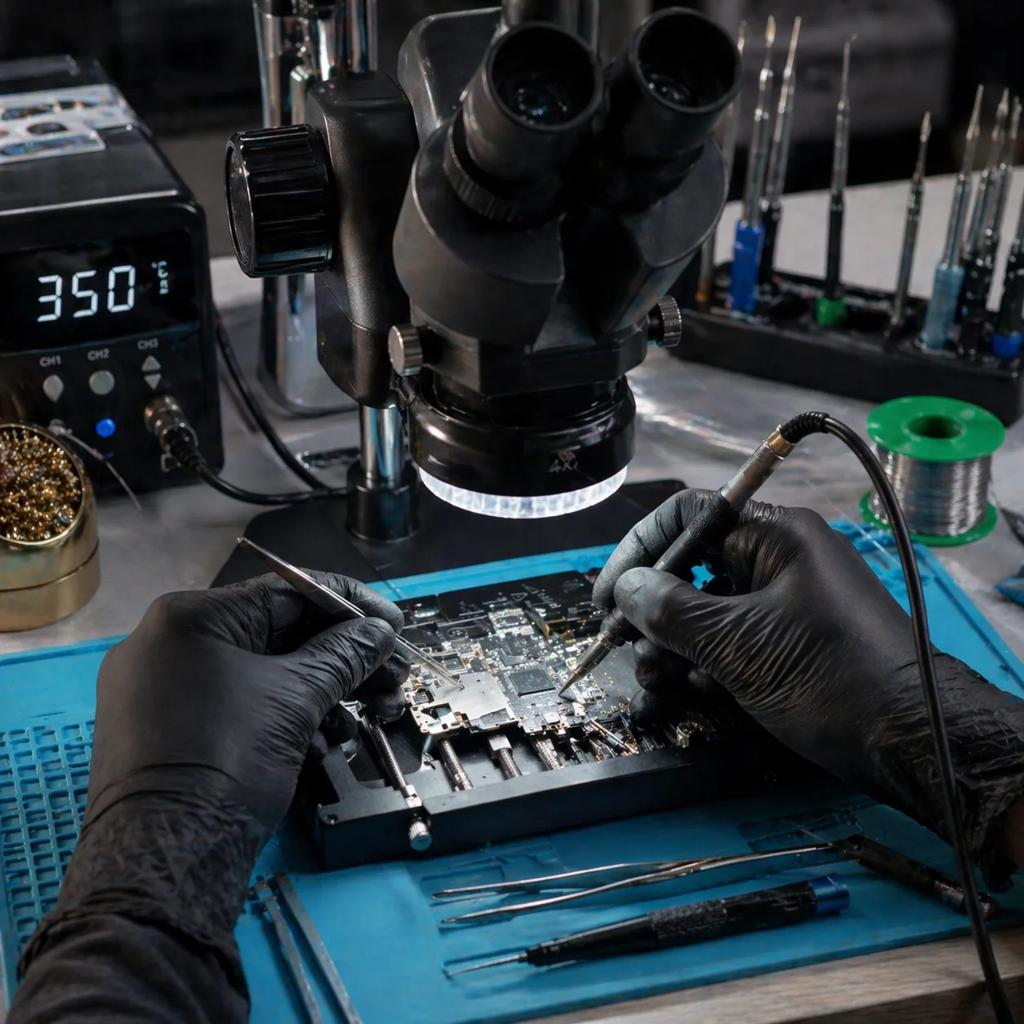
How Much Microscope Magnification Do You Really Need for Micro-Soldering?
When you’re repairing a mobile phone motherboard, some of the components you’re working on are so small that inspecting them with the naked eye becomes difficult. A microscope makes the work easier, but choosing one raises an important question: how much magnification do you actually need for micro-soldering?
It is tempting to assume that a microscope with the highest magnification is automatically the best choice. In practice, that isn’t always true.
Too little magnification can make tiny components difficult to inspect. Too much magnification can restrict your field of view, make it harder to follow your soldering iron or hot air nozzle, and leave you constantly adjusting the microscope.
The goal is not to buy the microscope with the biggest number on its specification sheet. It is to find one that gives you a clear, comfortable view of the work you perform.
What magnification do you need for mobile phone micro-soldering?
For most mobile phone motherboard repair work, a microscope offering a useful working range of approximately 10× to 40× optical magnification is a practical starting point.
This is a general buying guideline, not a fixed requirement for every repair. The ideal magnification depends on the microscope’s optical design, the size of the components, your working distance and the level of detail you need to see.
A lower magnification can be useful when inspecting a larger section of the board, locating components and positioning tools. Higher magnification helps when examining small solder joints, fine-pitch connections and other tiny details.
What matters is having a clear image across a useful range, rather than relying on one maximum magnification figure.
Why maximum magnification isn’t everything
Imagine buying a microscope advertised as offering 100× magnification. That number might look impressive, but it doesn’t automatically mean you’ll have a better micro-soldering experience.
There are several reasons.
1. A wider field of view makes work easier
The field of view is the area you can see through the microscope at one time.
At lower magnification, you can usually see a larger section of the motherboard. This helps you locate components, understand their position and move around the board.
As magnification increases, the visible area generally becomes smaller.
If you can only see a tiny section of the board, you may find yourself constantly moving the motherboard to keep track of your work.
For everyday motherboard repairs, a useful field of view can be just as important as magnification.
2. Working distance determines how much room you have
Working distance is the space between the microscope’s objective lens and the surface you’re inspecting.
This is particularly important for micro-soldering because your hands, soldering iron, tweezers and hot air nozzle all need room to move.
A microscope may offer impressive magnification but still be uncomfortable to work under if the available space is too limited.
Before buying, consider whether the microscope provides enough clearance for your normal repair tools and board positioning.
3. Image clarity matters more than impressive numbers
A microscope should give you a sharp, well-defined image.
You need to distinguish small components, inspect solder joints and identify visible damage without constantly struggling to focus.
A high magnification figure cannot compensate for poor optical quality, weak lighting or an image that becomes blurry as you zoom in.
Look for consistent image clarity throughout the magnification range you expect to use.
Understanding the different magnification levels
The following table is a practical way to think about magnification when selecting a microscope for phone motherboard work. Actual results vary between microscope models.
| Magnification range | Typical use |
|---|---|
| Around 5×–10× | General board inspection and locating components |
| Around 10×–20× | Component inspection and routine precision work |
| Around 20×–40× | Closer inspection of small solder joints and fine details |
| Above 40× | Specialised close inspection where the optics and working setup support it |
These ranges are indicative rather than universal. Some microscopes use different optical configurations, and advertised magnification may include digital enlargement.
The best choice is a microscope that lets you move between a wider view and a detailed view without sacrificing image quality or comfortable working space.
Optical magnification vs digital magnification
This distinction is especially important when comparing stereo and digital microscopes.
Optical magnification enlarges the image through the microscope’s optical system. It is the magnification produced by the lenses.
Digital magnification enlarges an image electronically, usually on a screen. It can make details appear bigger, but increasing the zoom does not necessarily reveal more genuine detail.
For example, a digital microscope may advertise a very high maximum zoom. However, the quality of the camera sensor, lens, screen resolution, lighting and image processing all influence what you can actually see.
Don’t compare a digital microscope’s advertised maximum zoom directly with the optical magnification of a stereo microscope. They are not necessarily measuring the same thing.
If you’re still deciding between these two microscope types, read our guide to stereo vs digital microscopes for phone repair.
What magnification is suitable for different repair tasks?
Different jobs require different levels of visual detail.
Inspecting a motherboard
When examining a board for corrosion, damaged components, missing parts or visible physical damage, a wider view is useful.
You need to understand the surrounding area rather than focus on one tiny point.
Inspecting solder joints
When checking solder joints, pads and component connections, increased magnification can help you examine the work more closely.
However, image clarity and lighting remain essential. A larger but blurry image won’t help you identify a problem accurately.
Micro-soldering small components
For precision work involving small components and fine-pitch connections, higher magnification may be useful.
You also need enough working distance to position your soldering iron, tweezers and other tools without constantly hitting the microscope.
Inspecting completed repairs
After soldering, you may need to inspect the repaired area for visible solder bridges, poor joints, displaced components or other signs of damage.
Being able to move between a wider view and a closer inspection makes this process more convenient.
Stereo microscope or digital microscope: which gives you a better working view?
For hands-on micro-soldering, a stereo microscope is often a strong choice because it provides a natural three-dimensional view of the work area.
That depth perception can help when positioning tools and working with components at different heights.
A digital microscope offers a screen-based view, which some technicians prefer for comfort, demonstrations or sharing what they are working on.
Neither option is automatically better for every technician. Consider your preferred working position, image quality, available space and the type of repairs you perform.
Our article on choosing the best microscope for mobile phone motherboard repair explains the wider buying considerations.
Five things to check before buying a micro-soldering microscope
Before choosing a microscope, look beyond the magnification printed on the box.
1. Magnification range: Does it offer a useful range for both general inspection and close-up work?
2. Optical quality: Is the image sharp, clear and comfortable to view?
3. Working distance: Can you comfortably position your soldering iron, tweezers and other tools underneath it?
4. Lighting: Does the setup provide sufficient, adjustable illumination without excessive glare?
5. Stability and adjustment: Is the stand stable, and can you position the microscope comfortably over the motherboard?
If you’re building a more complete workstation, you should also consider the supporting equipment. Our guides to choosing a soldering station for motherboard repair and choosing a hot air rework station cover two other important parts of the setup.
Common microscope buying mistakes to avoid
A few purchasing mistakes can leave you with equipment that looks impressive but doesn’t suit your daily work.
- Choosing the highest advertised magnification: A bigger number does not guarantee better image quality.
- Ignoring working distance: You need room to work beneath the microscope.
- Overlooking lighting: Poor illumination makes fine details harder to inspect.
- Confusing digital zoom with optical magnification: The two are not directly interchangeable.
- Buying without considering your repair tasks: A microscope for general inspection may not offer the working view you prefer for precision soldering.
A good microscope should make your work more comfortable and accurate, not turn every repair into an exercise in adjusting the equipment.
Where can you buy a microscope for mobile phone repair in Nairobi?
If you’re setting up or upgrading a phone repair workshop, Mutesh Ventures Ltd supplies mobile phone repair tools and equipment in Nairobi, Kenya.
You can explore the available equipment through the Mutesh Ventures catalogue or contact the team to enquire about microscope options and availability.
Mutesh Ventures Ltd
Accra Towers, 7th Floor, Shop D3, Kenneth Matiba Road, Nairobi CBD, Kenya.
Phone: 0724 946 622
Email: contact@muteshventures.com
Frequently asked questions
What is the best magnification for mobile phone micro-soldering?
A microscope with a useful working range around 10×–40× is a practical starting point for many motherboard repair tasks. The best range depends on the microscope’s optics, working distance and the components being inspected.
Is 40× magnification enough for micro-soldering?
It can be sufficient for many common phone motherboard tasks, provided the microscope delivers a clear image and gives you enough room to work. Some specialised jobs may benefit from higher magnification.
Is higher magnification always better?
No. Higher magnification generally reduces the field of view and can make positioning tools more difficult. Image clarity, working distance and a usable magnification range matter just as much.
What is the difference between optical and digital magnification?
Optical magnification enlarges the image through lenses. Digital magnification enlarges the image electronically on a screen. Digital zoom does not necessarily reveal additional detail.
Should I buy a stereo or digital microscope?
A stereo microscope provides a natural three-dimensional view that many technicians find useful for hands-on soldering. A digital microscope provides a screen-based view. Your preferred working style and the microscope’s actual image quality should guide the decision.
Does microscope lighting matter for micro-soldering?
Yes. Good lighting helps reveal component details, solder joints and visible board damage. Adjustable illumination is useful because reflective motherboard surfaces can create glare.
Final thoughts
The right microscope is not necessarily the one with the highest magnification. It is the one that gives you a clear view, enough working room and a comfortable way to inspect and repair small components.
For most phone repair technicians, a practical magnification range, good optics, suitable working distance and reliable lighting are a better combination than an impressive maximum zoom figure.
Choose for the work you actually do at the bench. That’s where the value of a microscope becomes clear.
Add a review
Your email address will not be published. Required fields are marked *